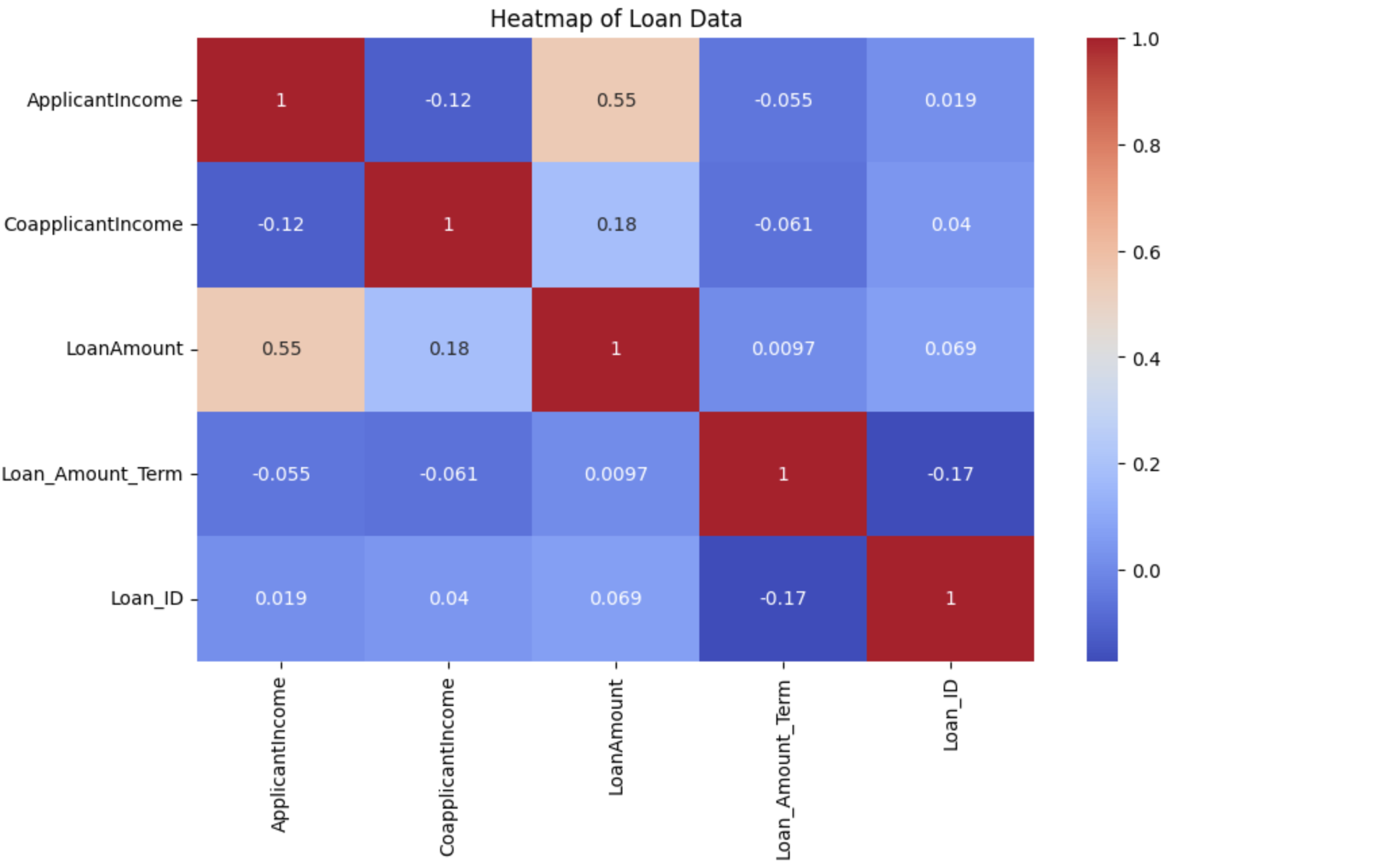
🚀 Automating Loan Application Processing with Machine Learning 🤖💰
I recently worked on preparing a loan application dataset to automate and optimize the loan approval process using machine learning algorithms.
🔧 Data Foundation
The journey began with building a strong data pipeline that included:
- ETL (Extract, Transform, Load)
- Data cleaning & preprocessing
- Exploratory Data Analysis (EDA)
- Data visualization
These steps helped uncover meaningful patterns in:
- Applicant demographics
- Credit scores
- Repayment histories
This provided a solid foundation for developing an ML model that predicts loan approval outcomes with high accuracy.
💡 Why Automation Matters
- ✅ Loan approval decisions that once took hours or days can now happen in seconds
- ✅ ML ensures consistent and objective risk assessment
- ✅ Faster turnaround → better customer experience
- ✅ Improved efficiency as human reviewers focus on exception cases, not routine decisions
This initiative demonstrates how machine learning + automation can transform financial operations — making them faster, smarter, and more data-driven.
Saffron_Skies_Airways_Saffron Airways VCS = 1.0.0
1.Extract, Transform and Load (ETL) Process
1.1 Importing all the required libraries for the project.
# importing pandas for data manipulation
import pandas as pd
# importing Numpy working with arrays
import numpy as np
# importing searborn and matplotlib for data visualisations
import seaborn as sns
import matplotlib.pyplot as plt
1.3 uploading and Loading CSV dataset File
Uploading dataset using google's file upload widget.
Loading the uploaded datafile by using read_CSV module of Pandas
# loading uploaded data file using read_csv module
df = pd.read_csv('UK_NATIONAL_AIRLINES_DATA_CW1 (S) (1).csv',encoding='ISO-8859-1')
# displaying the first five records of the dataset
df.head()
Displaying the basic information of the dataset before EDA which helps to better understand the data.
# Display basic information about the dataset
df.info()
df.head()
1.4 Checking For Null and NaN Values
Checking for blank fields in the dataset using isnull function.
# checking for blank fields
df.isnull()
1.5 Checking for NaN values in the data file and printing the total NaN values if exist using .sum() function.
# finding the total NaN vaues in the data file
nan_counts = df.isna().sum()
# printing the toal NaN values in the data file if exist.
print( "Total Null Values\n",nan_counts)
1.6 filling the 310 NA values of Arrival Delay in minutes with fillna
inplace = True will fill the data in the orginal dataset
# Filling the 310 NA values of Arrival Delay in minutes with fillna by
# taking the median of the column
df['Arrival Delay in Minutes'].fillna(df['Arrival Delay in Minutes'].median(), inplace=True)
# checking the NA vaues after filling the null values int the column
print(df.isna().sum())
2.Finding and Removing Duplicates
Finding the duplicates values in the dataset file using duplicated module with subset id and printing the total number of duplicate values.
# printing the total rows of the dataset
print("Total Data:", len(df))
# creating a list of duplicated values wih id in dataset
duplicate_data = df[df.duplicated(subset=['id'])]
# printing the total number of duplicate record
print("Duplicated Data:", len(duplicate_data))
# dispaying the duplicate values
print(duplicate_data)
2.1 Removing the duplicates from data file by using drop duplicates function and saving new excel file with no dupllicates.
# Removing the duplicates from dataset
cleaned_df = df.drop_duplicates(subset='id', keep='last')
# printing the total records after removing the same id
print("Total Records after removing duplicates: ", len(cleaned_df))
# displaying the first five records of dataset without duplicates
cleaned_df.head()
2.2 Converting Categorical Data into Numerical Data
converting categorical data into numerical value uing one-hot encoding: one-hot encoding converts categorical data into numerical format that can be effectively used by machine learning algorithms.
# Label encoding 'Satisfied' (Y=1, N=0)
cleaned_df['Satisfied'] = cleaned_df['Satisfied'].map({'Y': 1, 'N': 0})
# One-hot encode the other categorical features
categorical_columns = ['Gender', 'Age Band', 'Type of Travel', 'Class', 'Destination', 'Continent']
data_encoded = pd.get_dummies(cleaned_df, columns=categorical_columns, drop_first=True)
# Verify changes
data_encoded.head()
3.Exploratory Data Analysis (EDA) and Visualisations
summary statistics: Generating summary statistics for numerical colums. describe() method of pandas returns the quick overview of the dataset by displaying the columns' count, mean, standard deviation, Q1, median and Q3.
data_encoded.describe()
# printing the correlation between the columns
corr = data_encoded.corr()
corr
3.1 Distributions
The folowing code generated the distributions of the dataset column wise.
- numerical_columns stores the columns of the dataset.
- For loop is used to iterate through each column
- subplot generates the plots for each column
# Distribution plots for key numerical features
numerical_columns = ['Age', 'Flight Distance', 'Inflight wifi service',
'Departure/Arrival time convenient', 'Ease of Online booking',
'Gate location', 'Food and drink', 'Online boarding', 'Seat comfort',
'Inflight entertainment', 'On-board service', 'Leg room service',
'Baggage handling', 'Checkin service', 'Inflight service',
'Cleanliness', 'Departure Delay in Minutes', 'Arrival Delay in Minutes']
# Plotting distributions
plt.figure(figsize=(20, 15))
for i, column in enumerate(numerical_columns, 1):
plt.subplot(5, 4, i)
sns.histplot(data_encoded[column], kde=True, bins=30)
plt.title(f'Distribution of {column}')
plt.tight_layout()
plt.show()
# Bar Charts
cleaned_df['Gender'].value_counts().plot(kind='bar')
plt.title('Gender Distribution')
plt.xlabel('Gender')
plt.ylabel('Frequency')
plt.show()
# Scatter plot for Arrival Delay vs. Departure Delay, colored by Satisfaction
plt.figure(figsize=(10, 6))
sns.scatterplot(x='Arrival Delay in Minutes', y='Departure Delay in Minutes', hue='Satisfied', data=data_encoded, s=50, alpha=0.7)
plt.xlabel('Arrival Delay (minutes)')
plt.ylabel('Departure Delay (minutes)')
plt.title('Relationship between Arrival Delay, Departure Delay, and Satisfaction')
plt.legend(title='Satisfaction', loc='upper right')
plt.show()
# Step 2: Visualize the distribution of the 'Satisfied' variable
plt.figure(figsize=(6, 4))
sns.countplot(x='Satisfied', data=cleaned_df)
plt.title('Count of Satisfied vs. Not Satisfied')
plt.show()
# Categorical columns
categorical_columns = ['Gender', 'Age Band', 'Type of Travel', 'Class', 'Destination', 'Continent']
# 1. Pie Chart for 'Gender'
gender_satisfaction = cleaned_df.groupby(['Gender', 'Satisfied']).size().unstack()
labels = ['Male - Not Satisfied', 'Male - Satisfied', 'Female - Not Satisfied', 'Female - Satisfied']
sizes = gender_satisfaction.values.flatten()
colors = ['lightblue', 'blue', 'lightcoral', 'red']
plt.figure(figsize=(8, 8))
plt.pie(sizes, labels=labels, colors=colors, autopct='%1.1f%%', startangle=140)
plt.title('Customer Satisfaction by Gender')
plt.show()
3.2 Satisfaction rate comparison among different categories
The following code generates satisfactions rate comparision among diferent categories. barplot function is used to generate comparision of the data.
# Satisfaction rate comparison among different categories
plt.figure(figsize=(20, 10))
for i, column in enumerate(categorical_columns, 1):
plt.subplot(2, 3, i)
sns.barplot(x=column, y='Satisfied', data=cleaned_df)
plt.title(f'Satisfaction Rate by {column}')
plt.tight_layout()
plt.show()
3.4 Heatmap
Numerical data is selected from the cleaned dataset and heatmap() function of the sns library is used to generate the correlations, and anomalies of the dataset. By using color to represent data vaues, heatmaps faciliate qick insights and informed decision-making across various fields and applications.
# Correlation matrix heatmap
plt.figure(figsize=(15, 10))
# Select only numerical columns for correlation calculation
numerical_data = data_encoded.select_dtypes(include=['number'])
correlation_matrix = numerical_data.corr()
sns.heatmap(correlation_matrix, annot=True, cmap='coolwarm', fmt='.2f')
plt.title('Correlation Matrix Heatmap')
plt.show()
4.Analytical Model
In this section, utilising two algorithms, namely logistic regression and random forest, to create models and conduct in-depth analysis of the data. This analysis involves evaluating the models by carefully selecting the most suitable loss function to measure their performance.
4.1 Decision Tree
A Decision Tree is a supervised machine learning model used for classification and regression tasks. It represents decisions and their possible consequences, including chance event outcomes, as branches of a tree-like structure.
from sklearn.model_selection import train_test_split
from sklearn.preprocessing import StandardScaler
from sklearn.tree import DecisionTreeClassifier
from sklearn.metrics import accuracy_score, classification_report, confusion_matrix, mean_absolute_error, mean_squared_error, r2_score
from sklearn.metrics import roc_curve, roc_auc_score
# Example dataset (assuming 'data_encoded' is your dataset)
# Split the data into features (X) and target (y)
X = data_encoded.drop(['Ref', 'id', 'Satisfied'], axis=1)
y = data_encoded['Satisfied']
# Split the data into training and testing sets
X_train, X_test, y_train, y_test = train_test_split(X, y, test_size=0.2, random_state=42)
# Standardize the features
scaler = StandardScaler()
X_train = scaler.fit_transform(X_train)
X_test = scaler.transform(X_test)
# Initialize the Decision Tree Classifier
decision_tree = DecisionTreeClassifier(random_state=0)
# Train the Decision Tree model
decision_tree.fit(X_train, y_train)
# Predict on the test set
y_pred_tree = decision_tree.predict(X_test)
y_pred_proba = decision_tree.predict_proba(X_test)[:, 1] # Get probabilities for the positive class
# Evaluate the model using Accuracy and Classification Report
print("Decision Tree Classification - Evaluation Metrics:")
print(f"Accuracy Score: {accuracy_score(y_test, y_pred_tree):.4f}")
print(classification_report(y_test, y_pred_tree))
# Confusion Matrix and Heatmap
conf_matrix_tree = confusion_matrix(y_test, y_pred_tree)
sns.heatmap(conf_matrix_tree, annot=True, fmt='d', cmap='Blues')
plt.title("Confusion Matrix - Decision Tree Classification")
plt.xlabel("Predicted")
plt.ylabel("Actual")
plt.show()
# Print MAE, MSE, RMSE, and R-squared
# For classification metrics, these are computed on probabilities
print("Decision Tree Classification - Additional Metrics:")
print(f"Mean Absolute Error: {mean_absolute_error(y_test, y_pred_proba):.4f}")
print(f"Mean Squared Error: {mean_squared_error(y_test, y_pred_proba):.4f}")
print(f"Root Mean Squared Error: {np.sqrt(mean_squared_error(y_test, y_pred_proba)):.4f}")
# Visualization of MAE, MSE, RMSE
metrics = {'MAE': mae, 'MSE': mse, 'RMSE': rmse}
plt.figure(figsize=(8, 6))
plt.bar(metrics.keys(), metrics.values(), color=['skyblue', 'lightgreen', 'salmon'])
plt.xlabel('Metric')
plt.ylabel('Value')
plt.title('Error Metrics for Decision Tree Classification')
plt.grid(axis='y', linestyle='--', alpha=0.7)
plt.show()
# Optionally, visualize the decision tree (requires additional libraries)
from sklearn.tree import plot_tree
plt.figure(figsize=(20, 10))
plot_tree(decision_tree, filled=True, feature_names=X.columns, class_names=y.unique().astype(str), rounded=True)
plt.title("Decision Tree Visualization")
plt.show()
# ROC Curve
fpr, tpr, thresholds = roc_curve(y_test, y_pred_proba)
roc_auc = roc_auc_score(y_test, y_pred_proba)
# Plot ROC Curve
plt.figure(figsize=(10, 6))
plt.plot(fpr, tpr, color='blue', lw=2, label=f'ROC curve (area = {roc_auc:.2f})')
plt.plot([0, 1], [0, 1], color='grey', lw=2, linestyle='--')
plt.xlim([0.0, 1.0])
plt.ylim([0.0, 1.05])
plt.xlabel('False Positive Rate')
plt.ylabel('True Positive Rate')
plt.title('Receiver Operating Characteristic (ROC) Curve')
plt.legend(loc='lower right')
plt.grid(True)
plt.show()
4.2 Artificial Neural Network
An Artificial Neural Network (ANN) is a computational model inspired by the structure and functioning of the human brain. It consists of interconnected layers of nodes, or "neurons," which process input data and transform it into output through a series of weighted connections.
from sklearn.model_selection import train_test_split
from sklearn.preprocessing import StandardScaler
from sklearn.metrics import accuracy_score, precision_score, recall_score, f1_score, confusion_matrix
from sklearn.metrics import mean_absolute_error, mean_squared_error, r2_score
from tensorflow.keras.models import Sequential
from tensorflow.keras.layers import Dense
# Split the data into features (X) and target (y)
X = data_encoded.drop(columns = ['Ref','id', 'Satisfied'])
y = data_encoded['Satisfied']
# Split the data into training and testing sets
X_train, X_test, y_train, y_test = train_test_split(X, y, test_size=0.2, random_state=42)
# Standardize the features
scaler = StandardScaler()
X_train = scaler.fit_transform(X_train)
X_test = scaler.transform(X_test)
# Build the ANN model
model = Sequential()
# Input layer
model.add(Dense(units=64, activation='relu', input_dim=X_train.shape[1]))
# Hidden layers
model.add(Dense(units=32, activation='relu'))
model.add(Dense(units=16, activation='relu'))
# Output layer
model.add(Dense(units=1, activation='sigmoid')) # Sigmoid for binary classification
# Compile the model
model.compile(optimizer='adam', loss='binary_crossentropy', metrics=['accuracy'])
# Train the model
history = model.fit(X_train, y_train, epochs=20, batch_size=32, validation_split=0.2)
# Predict on the test set
y_pred_ann = model.predict(X_test)
y_pred_ann_binary = (y_pred_ann >= 0.5).astype(int)
# Evaluate the model
accuracy = accuracy_score(y_test, y_pred_ann_binary)
precision = precision_score(y_test, y_pred_ann_binary)
recall = recall_score(y_test, y_pred_ann_binary)
f1 = f1_score(y_test, y_pred_ann_binary)
print("Artificial Neural Network Evaluation Metrics:")
print(f"Accuracy: {accuracy:.4f}")
print(f"Precision: {precision:.4f}")
print(f"Recall: {recall:.4f}")
print(f"F1 Score: {f1:.4f}")
# Calculate MAE, MSE, RMSE, and R-squared
mae = mean_absolute_error(y_test, y_pred_ann_binary)
mse = mean_squared_error(y_test, y_pred_ann_binary)
rmse = np.sqrt(mse)
# Visualization of MAE, MSE, RMSE
metrics = {'MAE': mae, 'MSE': mse, 'RMSE': rmse}
plt.figure(figsize=(8, 6))
plt.bar(metrics.keys(), metrics.values(), color=['skyblue', 'lightgreen', 'salmon'])
plt.xlabel('Metric')
plt.ylabel('Value')
plt.title('Error Metrics for Decision ANN')
plt.grid(axis='y', linestyle='--', alpha=0.7)
plt.show()
# For R-squared, you can use the following approach:
# Convert binary predictions to a format that r2_score can handle
# Note: r2_score is not typically used for classification, but for demonstration purposes:
y_pred_ann_continuous = y_pred_ann.flatten() # Flatten to match y_test shape
r2 = r2_score(y_test, y_pred_ann_continuous)
print(f"Mean Absolute Error (MAE): {mae:.4f}")
print(f"Mean Squared Error (MSE): {mse:.4f}")
print(f"Root Mean Squared Error (RMSE): {rmse:.4f}")
print(f"R-squared (R²): {r2:.4f}")
print('10% of the Mean of Satisfaction:', cleaned_df['Satisfied'].mean() * 0.1)
# Plot training & validation accuracy and loss values
plt.figure(figsize=(14, 6))
plt.subplot(1, 2, 1)
plt.plot(history.history['accuracy'], label='Train Accuracy')
plt.plot(history.history['val_accuracy'], label='Validation Accuracy')
plt.title('Model Accuracy')
plt.xlabel('Epoch')
plt.ylabel('Accuracy')
plt.legend()
plt.subplot(1, 2, 2)
plt.plot(history.history['loss'], label='Train Loss')
plt.plot(history.history['val_loss'], label='Validation Loss')
plt.title('Model Loss')
plt.xlabel('Epoch')
plt.ylabel('Loss')
plt.legend()
plt.show()
# Confusion Matrix
conf_matrix_ann = confusion_matrix(y_test, y_pred_ann_binary)
sns.heatmap(conf_matrix_ann, annot=True, fmt='d', cmap='Blues')
plt.title("Confusion Matrix - Artificial Neural Network")
plt.show()
! pip install tabulate
from tabulate import tabulate
# Decision Tree metrics
decision_tree_metrics = {
"Model": "Decision Tree",
"Accuracy": accuracy_score(y_test, y_pred_tree),
"Precision": precision_score(y_test, y_pred_tree),
"Recall": recall_score(y_test, y_pred_tree),
"F1 Score": f1_score(y_test, y_pred_tree),
"MAE": mean_absolute_error(y_test, y_pred_proba),
"MSE": mean_squared_error(y_test, y_pred_proba),
"RMSE": np.sqrt(mean_squared_error(y_test, y_pred_proba)),
"R-squared": r2_score(y_test, y_pred_proba)
}
# ANN metrics
ann_metrics = {
"Model": "ANN",
"Accuracy": accuracy,
"Precision": precision,
"Recall": recall,
"F1 Score": f1,
"MAE": mean_absolute_error(y_test, y_pred_ann_binary),
"MSE": mean_squared_error(y_test, y_pred_ann_binary),
"RMSE": np.sqrt(mean_squared_error(y_test, y_pred_ann_binary)),
"R-squared": r2
}
# Create a DataFrame to compare the metrics
metrics_df = pd.DataFrame([decision_tree_metrics, ann_metrics])
# Set 'Model' column as index for better visualization
metrics_df.set_index('Model', inplace=True)
# Use tabulate to print the DataFrame in a nice format
print(tabulate(metrics_df, headers='keys', tablefmt='pretty'))
model.summary()