đš As a Data Analyst, if you're still building dashboards with fancy visualizationsâŠ
Youâre missing the real value your company needs.
Dashboards donât drive decisions â business insights do.
A beautiful chart means nothing if it doesnât answer a real business question.
In todayâs data-driven world, a Data Analyst must be able to:
đ Identify the problem
â Define clear business questions
đ Analyze what matters
đ§ Provide actionable insights
đ Recommend solutions
đ Then track and enhance continuously
Thatâs where the real impact lies.
Our job isn't just to visualize data; it's to solve a business problem by answering a core question and providing clear findings, a strong recommendation, and a monitoring plan.
Here's a look at my latest project, which aimed to solve a critical business problem for a product launch:
- Which sales method is the most profitable and time-efficient? đŻ
-
How many customers were there for each approach?
-
What does the spread of the revenue look like overall? And for each method?
-
Was there any difference in revenue over time for each of the methods?
-
Based on the data, which method would you recommend we continue to use?
1.Data validation¶
1.1 Setup and load the dataset¶
# import all the required libraries
import pandas as pd
import numpy as np
import matplotlib.pyplot as plt
import seaborn as sns
# for Nicer plots
sns.set(style="whitegrid")
# load the dataset and print the first five rows
df = pd.read_csv("product_sales.csv")
df.head()
| week | sales_method | customer_id | nb_sold | revenue | years_as_customer | nb_site_visits | state | |
|---|---|---|---|---|---|---|---|---|
| 0 | 2 | 2e72d641-95ac-497b-bbf8-4861764a7097 | 10 | NaN | 0 | 24 | Arizona | |
| 1 | 6 | Email + Call | 3998a98d-70f5-44f7-942e-789bb8ad2fe7 | 15 | 225.47 | 1 | 28 | Kansas |
| 2 | 5 | Call | d1de9884-8059-4065-b10f-86eef57e4a44 | 11 | 52.55 | 6 | 26 | Wisconsin |
| 3 | 4 | 78aa75a4-ffeb-4817-b1d0-2f030783c5d7 | 11 | NaN | 3 | 25 | Indiana | |
| 4 | 3 | 10e6d446-10a5-42e5-8210-1b5438f70922 | 9 | 90.49 | 0 | 28 | Illinois |
2. Data Validation and cleaning(column by column)¶
2.1 Validate (Week)¶
The goal here is to check that week is integer, with in 1-6, and has no missing values.
# check basic properties of 'week'
print(df['week'].describe())
print("Unique weeks:", sorted(df['week'].unique()))
print("Missing values:", df['week'].isna().sum())
# assert that week is in the expected range
assert df['week'].between(1,6).all, "week has values outside 1-6"
count 15000.000000 mean 3.098267 std 1.656420 min 1.000000 25% 2.000000 50% 3.000000 75% 5.000000 max 6.000000 Name: week, dtype: float64 Unique weeks: [1, 2, 3, 4, 5, 6] Missing values: 0
From this check,week values are integers between 1 and 6 with no missing entries, so no cleaning is required.
2.2 Validate and clean(sales method)¶
Here the code checks the raw categories, then standarises them into a cleaned sales_method_clean column with only three levels: Email, Call, Email + Call.
# inspect raw categories
print(df['sales_method'].value_counts(dropna=False))
# Create a cleaned version of sales_method
df['sales_method_clean'] = df['sales_method'].str.strip()
# Standardise variations of "email" to "Email"
df['sales_method_clean'] = df['sales_method_clean'].str.replace(
r'(?i)^email$', 'Email', regex=True
)
# fix typo like "em + call" to "Email + Call"
df['sales_method_clean'] = df['sales_method_clean'].replace({'em + call':"Email + Call"})
# Verify cleaned categories
print(df['sales_method_clean'].value_counts(dropna=False))
Email 7456 Call 4962 Email + Call 2549 em + call 23 email 10 Name: sales_method, dtype: int64 Email 7466 Call 4962 Email + Call 2572 Name: sales_method_clean, dtype: int64
2.3 Validate(customer_id)¶
This code checks uniqueness and missingness of the customer IDs.
# Check the uniqueness and missing of customer IDs
print("Missing customer_id:", df['customer_id'].isna().sum())
print("Unique customer_id:", df['customer_id'].nunique())
# check if any customer_id appears with multiple methods
dups_ids = df.groupby('customer_id')['sales_method_clean'].nunique()
print("Customers with more tha one method", (dups_ids >1).sum())
Missing customer_id: 0 Unique customer_id: 15000 Customers with more tha one method 0
There are no missing customer_id values and that IDs appear unique per row, so no cleaning is nedded here.
2.4 Validate(nb_sold)¶
This code check the distribution of units sold and ensures all values are posotive integers.
print(df['nb_sold'].describe())
print("Unique nb_solds:", sorted(df['nb_sold'].unique())[:20])
print("Missing nb_solds", df['nb_sold'].isna().sum())
# check for non-positive values
print("any nb_solf <= 0:", (df['nb_sold']<= 0).any())
count 15000.000000 mean 10.084667 std 1.812213 min 7.000000 25% 9.000000 50% 10.000000 75% 11.000000 max 16.000000 Name: nb_sold, dtype: float64 Unique nb_solds: [7, 8, 9, 10, 11, 12, 13, 14, 15, 16] Missing nb_solds 0 any nb_solf <= 0: False
nb_sold ranges roughly from 7 to 16 with no missing or non-positive values, so no additional cleaning is required.
2.5 Validate (revenue)¶
check missingness and the basic distribution of revenue.
print(df['revenue'].describe())
print("Missing revenue:", df['revenue'].isna().sum())
# Look at a few rows with missing revenue
print(df[df['revenue'].isna()].head())
count 13926.000000
mean 93.934943
std 47.435312
min 32.540000
25% 52.470000
50% 89.500000
75% 107.327500
max 238.320000
Name: revenue, dtype: float64
Missing revenue: 1074
week sales_method ... state sales_method_clean
0 2 Email ... Arizona Email
3 4 Email ... Indiana Email
16 2 Email ... Pennsylvania Email
17 6 Email + Call ... Wisconsin Email + Call
28 5 Email ... Florida Email
[5 rows x 9 columns]
since there are 1,074 missing revenue values and no obvious way to impute them reliably, the analysis keeps those rows for non-revenue summaries but excludes them for any revenue based statistics.
2.6 Validate(years_as_customer)¶
This code confirms that customer tenue is non-negative and examines its distribution.
print(df['years_as_customer'].describe())
print("MIssing Values:", df['years_as_customer'].isna().sum())
print("Any negative tenure", (df['years_as_customer']<= 0).any())
count 15000.000000 mean 4.965933 std 5.044952 min 0.000000 25% 1.000000 50% 3.000000 75% 7.000000 max 63.000000 Name: years_as_customer, dtype: float64 MIssing Values: 0 Any negative tenure True
The output shows a reasonable distribution(with some customers at 0 years and some much older) and no missing values, so no changes are needed.
2.7 validate (nb_site_visits)¶
This step checks that site visits are non-negative integers and not minnig values.
print(df['nb_site_visits'].describe())
print("Missing Values:", df['nb_site_visits'].isna().sum())
print("Any nb_site_visits <=0", (df['nb_site_visits'] <= 0).any())
count 15000.000000 mean 24.990867 std 3.500914 min 12.000000 25% 23.000000 50% 25.000000 75% 27.000000 max 41.000000 Name: nb_site_visits, dtype: float64 Missing Values: 0 Any nb_site_visits <=0 False
The value looks reasonable(roughly 12-14 visits) and there are no missing entries, so no cleaning is needed.
2.8 Validate (state)¶
This code inspects the state field cna checks for missing values.
print("Missing Values:", df['state'].isna().sum())
print(df['state'].value_counts().head())
Missing Values: 0 California 1872 Texas 1187 New York 965 Florida 904 Illinois 617 Name: state, dtype: int64
No cleanin is required for state, and it can be used for geographical breakdowns.
# verify the cleaning of the dataset by printing the first 10 rows
df.head(10)
| week | sales_method | customer_id | nb_sold | revenue | years_as_customer | nb_site_visits | state | sales_method_clean | |
|---|---|---|---|---|---|---|---|---|---|
| 0 | 2 | 2e72d641-95ac-497b-bbf8-4861764a7097 | 10 | NaN | 0 | 24 | Arizona | ||
| 1 | 6 | Email + Call | 3998a98d-70f5-44f7-942e-789bb8ad2fe7 | 15 | 225.47 | 1 | 28 | Kansas | Email + Call |
| 2 | 5 | Call | d1de9884-8059-4065-b10f-86eef57e4a44 | 11 | 52.55 | 6 | 26 | Wisconsin | Call |
| 3 | 4 | 78aa75a4-ffeb-4817-b1d0-2f030783c5d7 | 11 | NaN | 3 | 25 | Indiana | ||
| 4 | 3 | 10e6d446-10a5-42e5-8210-1b5438f70922 | 9 | 90.49 | 0 | 28 | Illinois | ||
| 5 | 6 | Call | 6489e678-40f2-4fed-a48e-d0dff9c09205 | 13 | 65.01 | 10 | 24 | Mississippi | Call |
| 6 | 4 | eb6bd5f1-f115-4e4b-80a6-5e67fcfbfb94 | 11 | 113.38 | 9 | 28 | Georgia | ||
| 7 | 1 | 047df079-071b-4380-9012-2bfe9bce45d5 | 10 | 99.94 | 1 | 22 | Oklahoma | ||
| 8 | 5 | 771586bd-7b64-40be-87df-afe884d2af9e | 11 | 108.34 | 10 | 31 | Massachusetts | ||
| 9 | 5 | Call | 56491dae-bbe7-49f0-a651-b823a01103d8 | 11 | 53.82 | 7 | 23 | Missouri | Call |
Exploratory analysis and graphics¶
This section shows code to the main business question and generate the plots.
3.1 Customer per sales approach¶
The code below calculates how many customers are in each sales methods and plots a bar chart.
# Customers per cleaned sales method
method_counts = df['sales_method_clean'].value_counts().reset_index()
method_counts.columns = ['sales_method', 'n_customers']
print(method_counts)
# Bar chart: number of customers per method
plt.figure(figsize=(6,6))
ax = sns.barplot(data=method_counts,
x='sales_method',
y='n_customers',
palette='Blues_d')
# Add data labels on each bar
for p in ax.patches:
ax.annotate(
format(p.get_height(), '.0f'),
(p.get_x() + p.get_width()/2., p.get_height()),
ha='center',
va='bottom'
)
plt.title("Number of Customers per Sales Method")
plt.show()
sales_method n_customers 0 Email 7466 1 Call 4962 2 Email + Call 2572
From this output 7,466 Email customers, 6,962 Call custoemrs, and 3,572 Email + Call customers, confirming that Emai has the broadest reach.
3.2 Revenue distribution overall¶
This code produces summary statistics and a histogram for revenue across all the methods combined.
# Drop missing revenue for distribution analysis
df_rev = df.dropna(subset=['revenue'])
# Summary statistics
print(df_rev['revenue'].describe())
# Histogram of overall revenue
plt.figure(figsize=(8,6))
sns.histplot(df_rev['revenue'], bins=30, color='blue')
plt.title("Distribution of Revenue jper Customer (All Methods)")
plt.xlabel("Revenue")
plt.ylabel("Count")
plt.tight_layout()
plt.show()
count 13926.000000 mean 93.934943 std 47.435312 min 32.540000 25% 52.470000 50% 89.500000 75% 107.327500 max 238.320000 Name: revenue, dtype: float64
The summary and histogram show that revenue per customer spans roughly from the mid-30s to around 200, with distinct peaks driven by the different sales methods.
3.3 Revenue distribution by methods.¶
This code summarises revenue by sales_method_clean and draws a boxplot to compare distributios.
# Summary stats by method
rev_by_method = df_rev.groupby('sales_method_clean')['revenue'].describe()
print(rev_by_method)
# Boxplot of revenue by method
plt.figure(figsize=(6,6))
sns.boxplot(data=df_rev,
x='sales_method_clean',
y='revenue',
palette='Pastel1')
plt.title("Revenue per customer by Sales Method")
plt.xlabel("Sales Method")
plt.ylabel("Revenue")
plt.tight_layout()
plt.show()
count mean std ... 50% 75% max sales_method_clean ... Call 4781.0 47.597467 8.609899 ... 49.07 52.68 71.36 Email 6922.0 97.127684 11.210469 ... 95.58 105.17 148.97 Email + Call 2223.0 183.651233 29.083924 ... 184.74 191.11 238.32 [3 rows x 8 columns]
From the groupped statistics, mean revenues are about 47.76 for call, 97.1 for Email, and 183.7 for Email + Call, with Email + Call clearly highest and also more variable. The Boxplot visually confrims that the median ad upper quartiles aree lowest for call, higher for Email, and highest for Email + Call.
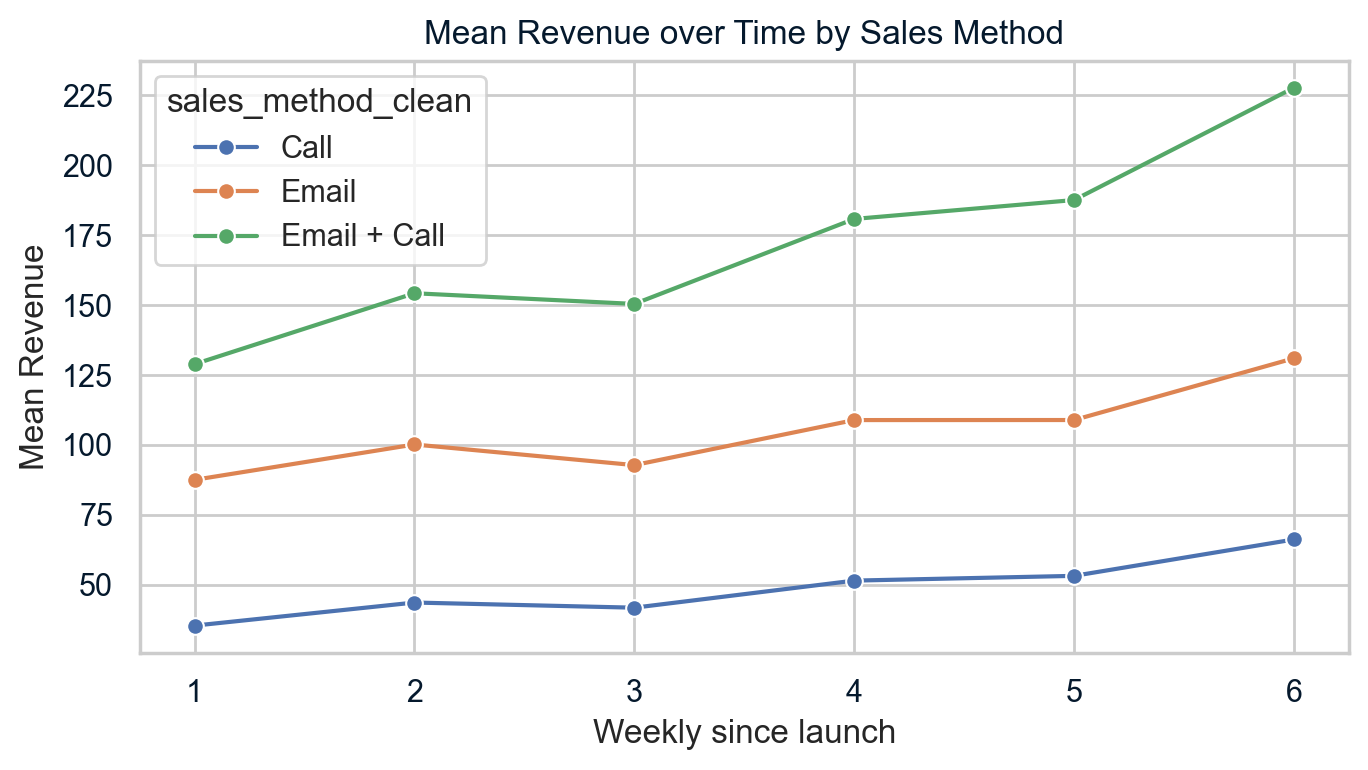
3.4 Revenue ove time by method¶
This code calculates mean revenue per week and moethod, then plots time trends.
# Mean revenue by week and method (excluding missing revenue)
weekly_rev = (df_rev.groupby(['week','sales_method_clean'])['revenue'].mean().reset_index())
print(weekly_rev.head())
# Line plot: revenue orver the time by method
plt.figure(figsize=(7,4))
sns.lineplot(data=weekly_rev,
x='week',
y='revenue',
hue='sales_method_clean',
marker='o')
plt.title("Mean Revenue over Time by Sales Method")
plt.xlabel("Weekly since launch")
plt.ylabel("Mean Revenue")
plt.xticks(sorted(df['week'].unique()))
plt.tight_layout()
plt.show()
week sales_method_clean revenue 0 1 Call 35.350243 1 1 Email 87.496401 2 1 Email + Call 128.895649 3 2 Call 43.602606 4 2 Email 100.139121
The table and line chart shows that mean revenue increases from week 1 to week 6 for all methods and the Email + Calls is consistently highest, Email is in the middle, and call is lowest at each week.
3.5 Customer characteristics by method¶
This code compares years_as_customer and nb_site_visits across methods to understand customer mix.
cust_char = df.groupby('sales_method_clean')[['years_as_customer', 'nb_site_visits']].agg(['mean', 'median','std'])
print(cust_char)
years_as_customer ... nb_site_visits
mean median ... median std
sales_method_clean ...
Call 5.176743 4.0 ... 24.0 3.599864
Email 4.983793 3.0 ... 25.0 3.281552
Email + Call 4.507387 3.0 ... 27.0 3.357916
[3 rows x 6 columns]
The results show that tenure is smaller across method (around 4.5-5.2 years on average), Email + Call customer have slightly higher site visits on average, suggesting they tend to be more digitally engaged.
4. Business metric¶
The main business metric is revenue per minute of sales effort, based on assumed time per customer for each method.
4.1 Time assumptions and mean revenue per customer¶
This code uses the dataset to compute mean revenue per customer by method.
# Mean revenue per customer by method (excluding missing revenue)
mean_rev_by_method = (df_rev.groupby('sales_method_clean')['revenue'].mean().reset_index())
mean_rev_by_method.columns = ['sales_method', 'mean_revenue']
print(mean_rev_by_method)
sales_method mean_revenue 0 Call 47.597467 1 Email 97.127684 2 Email + Call 183.651233
The output confrims appropriate means of 47.6(Call), 97.1(Email), 183.7(Email + Calls).
4.2 Revenue per minute¶
Let revenue per minute=(mean revenue per customer)/(minutes of effort per customer) The code below applies the above formula using the assumed effort: Email 5 minutes, Call 30 minutes, Email + Call 15 minutes.
# Assumed minutes of sales effort per customer for each method
minutes_per_customer = {
'Email': 5,
'Call': 30,
'Email + Call': 15
}
# Map minutes into the summary table
mean_rev_by_method['minutes_per_customer'] = \
mean_rev_by_method['sales_method'].map(minutes_per_customer)
# Compute revenue per minute
mean_rev_by_method['revenue_per_minute'] = (
mean_rev_by_method['mean_revenue'] /
mean_rev_by_method['minutes_per_customer']
)
print(mean_rev_by_method)
sales_method mean_revenue minutes_per_customer revenue_per_minute 0 Call 47.597467 30 1.586582 1 Email 97.127684 5 19.425537 2 Email + Call 183.651233 15 12.243416
The output show that revenue per minute of roughly 1.59 for call, 19.43 for Email,12.24 for Email + call, Showing that Email is the most time-efficnent method, followed by Email + Call.
5. Summary and Recommendation¶
The following code prints all the summary to findings.
print("=== Customers per method ===")
print(method_counts)
print("\n=== Revenue per customer by method ===")
print(rev_by_method[['mean', '50%', 'std']]) # mean, median (50%), std
print("\n=== Weekly mean revenue by method ===")
print(weekly_rev.sort_values(['sales_method_clean', 'week']).head(18))
print("\n=== Customer characteristics by method ===")
print(cust_char)
print("\n=== Efficiency metric: revenue per minute ===")
print(mean_rev_by_method)
=== Customers per method ===
sales_method n_customers
0 Email 7466
1 Call 4962
2 Email + Call 2572
=== Revenue per customer by method ===
mean 50% std
sales_method_clean
Call 47.597467 49.07 8.609899
Email 97.127684 95.58 11.210469
Email + Call 183.651233 184.74 29.083924
=== Weekly mean revenue by method ===
week sales_method_clean revenue
0 1 Call 35.350243
3 2 Call 43.602606
6 3 Call 41.759528
9 4 Call 51.446048
12 5 Call 53.146087
15 6 Call 66.166089
1 1 Email 87.496401
4 2 Email 100.139121
7 3 Email 92.762573
10 4 Email 108.877141
13 5 Email 108.892313
16 6 Email 130.976519
2 1 Email + Call 128.895649
5 2 Email + Call 154.246959
8 3 Email + Call 150.423272
11 4 Email + Call 180.822633
14 5 Email + Call 187.588343
17 6 Email + Call 227.770635
=== Customer characteristics by method ===
years_as_customer ... nb_site_visits
mean median ... median std
sales_method_clean ...
Call 5.176743 4.0 ... 24.0 3.599864
Email 4.983793 3.0 ... 25.0 3.281552
Email + Call 4.507387 3.0 ... 27.0 3.357916
[3 rows x 6 columns]
=== Efficiency metric: revenue per minute ===
sales_method mean_revenue minutes_per_customer revenue_per_minute
0 Call 47.597467 30 1.586582
1 Email 97.127684 5 19.425537
2 Email + Call 183.651233 15 12.243416
5.1 Summary¶
From these outpts, Email + Call yields the highest revenue per customer, Email is mid-range, and Call is lowest; yet Email has the highest revenue per minute, followed by Email + Call, making Call the least efficient. The weekly table confirms that these relative rankings hold in every week from lauch to week six, while all methods show increasing revenue over time.
5.2 Recommendations¶
- Make Email the defalt sales method
- Email reaches the laregest share of customers (7,466 vs. 4,962 Call and 2,572 Email + Calls), so standardising on Email maximises coverage with minimal extra operational complexity.
- Email also delivers strong revenue per customer (mean â 97) while being far more time-efficent than phone-based approach, making it the best baseline method.
- Use Email + Call selectively for high-potential Customers
- Email + Calls generates the highest revenue per customer (mean â 184), almost double Email and nearly four times Call, so it is worth the extra effort where upside is large.
- Because Email + Call customer show slightly higher website engagement on average, the combined method should be targeted to more engaged or strategically important accounts (e.g. high site visits, key logos)
- Reduce or Phase out Call-only campaigns for this product line
- Call-only customers have the lowest mean revenue ( â 48) and the lowest revenue per minute ( â 1.6), making this the least efficient use of the sales team's time.
- Given Email and Email + Call both outperform Call in absolute revenue and efficiency, phone-only outreach should be reserved for exceptional cases where a direct call is clearly required.
- Adopt "revenue per minute" as the primary perfomance mertric
- Track revenue per minute of sales effort by method, using the current estimates ( â 19.4 for Email, â 12.2 for Email + Call, â 1.6 for Call) as initial benchmarks and targets.
- Monitor this metric weekly by method and compare against historical values to detect drops in efficiency early and trigger reviews of scripts, targeting, or cadences.
- Segment and monitor by customer engagement and tenure
- Since Email + Call is currently used more with engaged customers (higher site visits), segment the revenue-per-minute metric by engagement band to ensure perfomance changes are not just shifts in customer mix.
- Similarly, monitor results across tenure bands (e.g. 0-2 years vs 3-7 vs 5+ years) to confrim that one method is not over- or under-serving specific relationship stages.
- Improve data quality and re-run the analysis periodically
- Investigate and fix the missing revenue in the source system so future reports can use compplete revenue and validate that current conclusions remain robust.
- Re-run the same analysis and metric after each major campaign or every quarter to refine targeting rules (which customer get Email vs. Email + Calls) as more data accumulates.